---
title: Focus on Important Emails - Not on Clutter
description: Focused Inbox is an improvement of the Clutter feature, which makes it easier to see new incoming messages without having to navigate to different folders.
image: https://blog.integrityts.com/hubfs/Images/FocusEmails.jpg
---
[](https://www.integrityts.com/)
- [Who We Are](https://www.integrityts.com/who-we-are/)
- [Our Team](https://www.integrityts.com/who-we-are/our-team/)
- [Partners & Certifications](https://www.integrityts.com/who-we-are/partners-certifications/)
- [NIST Cybersecurity Framework](https://www.integrityts.com/who-we-are/nist-cybersecurity-framework/)
- [Careers](https://www.integrityts.com/careers/)
- [Industries](https://www.integrityts.com/industries/)
- [Financial Institutions](https://www.integrityts.com/industries/financial-institutions/)
- [Healthcare](https://www.integrityts.com/industries/healthcare/)
- [Insurance](https://www.integrityts.com/industries/insurance/)
- [Manufacturing](https://www.integrityts.com/industries/manufacturing/)
- [Services](https://www.integrityts.com/services/)
- [Co-Managed IT Support](https://www.integrityts.com/services/co-managed-it-support/)
- [IT Cybersecurity](https://www.integrityts.com/services/it-cybersecurity/)
- [IT Support](https://www.integrityts.com/services/it-support/)
- [Technology Advisement](https://www.integrityts.com/services/it-support/technology-advisement/)
- [Managed Security](https://www.integrityts.com/services/it-support/managed-security/)
- [RemoteFix Help Desk](https://www.integrityts.com/services/it-support/remotefix-help-desk/)
- [Security Awareness Program](https://www.integrityts.com/services/it-support/security-awareness-program/)
- [Managed Cloud Security](https://www.integrityts.com/services/it-support/managed-cloud-security/)
- [Vulnerability Management](https://www.integrityts.com/services/it-support/vulnerability-management/)
- [Managed Detection & Response](https://www.integrityts.com/services/it-support/managed-detection-response/)
- [Managed Backup & Disaster Recovery](https://www.integrityts.com/services/it-support/managed-backup-disaster-recovery/)
- [Teams Phones (Voice)](https://www.integrityts.com/services/it-support/teams-phones-voice/)
- [IT Tool Kit](https://www.integrityts.com/services/it-support/it-tool-kit/)
- [Password Management / LAPS – Copy](https://www.integrityts.com/services/it-support/password-management-laps/)
- [Secure Cloud / Hosted Infrastructure](https://www.integrityts.com/services/it-support/secure-cloud-hosted-infrastructure/)
- [Microsoft 365 Licensing/New Commerce Experience](https://www.integrityts.com/services/it-support/microsoft-365-licensing-new-commerce-experience/)
- [IT Professional Services & Consulting](https://www.integrityts.com/services/it-professional-services-consulting/)
- [Network Infrastructure](https://www.integrityts.com/services/it-professional-services-consulting/network-infrastructure/)
- [Cloud Migrations](https://www.integrityts.com/services/it-professional-services-consulting/cloud-migrations/)
- [Incident Response](https://www.integrityts.com/services/it-professional-services-consulting/incident-response/)
- [SharePoint Consulting](https://www.integrityts.com/services/it-professional-services-consulting/sharepoint-consulting/)
- [Security Risk Assessments](https://www.integrityts.com/services/it-professional-services-consulting/security-risk-assessments/)
- [Tabletop Exercises](https://www.integrityts.com/services/it-professional-services-consulting/tabletop-exercises/)
- [AI Capabilities](https://www.integrityts.com/services/it-professional-services-consulting/ai-capabilities/)
- [Administrative Policies & Controls](https://www.integrityts.com/services/it-professional-services-consulting/administrative-policies-controls/)
- [HIPAA Risk Assessments](https://www.integrityts.com/services/it-professional-services-consulting/hipaa-risk-assessments/)
- [MIPS Consulting](https://www.integrityts.com/services/it-professional-services-consulting/mips-consulting/)
- [SAFER Guides Consulting](https://www.integrityts.com/services/it-professional-services-consulting/safer-guides-consulting/)
- [Pricing](https://www.integrityts.com/pricing/)
- [Blog](https://blog.integrityts.com/)
- [Contact](https://www.integrityts.com/contact/)
# Blog
## Focus on Important Emails - Not on Clutter
[Nikki Fulfer](https://blog.integrityts.com/author/nikki-fulfer)
January 15, 2018 at 10:00 AM
Microsoft released an Outlook feature in 2015 with the benefits of de-cluttering the inbox by moving less important messages from the inbox and into a separate folder labeled "Clutter". Using algorithms that adjust based on analyzing user email habits, and based on past user behavior, it will determine what is considered low priority and move those messages into the clutter folder.
After finding that it was difficult to stay on top of incoming messages as they were being filtered into two separate locations: Inbox or Clutter; Microsoft incorporated a new feature that separated emails into 2 tabs: "Focused" and "Other", placing important messages into the Focused Inbox and everything else into the Other Inbox. This provides users more control over what they want to see now, and what they would like to see later.
## Clutter v. Focused Inbox
Focused Inbox isn't necessarily a new feature, rather, it is a refinement and improvement of the Clutter feature. Clutter's purpose was to help focus on the most important messages in the inbox, but it did so by moving lower priority messages into a separate folder. Focused Inbox will make it easier for to see all new incoming messages without having to navigate to an entirely different folder.
Clutter will be going away at the end of January 2020. Which means at some point, users will need to learn how to use the new Focused Inbox features. Focused Inbox is the long-term replacement for Clutter, as it carries all the same features of Clutter but removes the need to navigate to other folders.
### What happens to the Clutter Folder if the Focused Inbox is enabled?
Any emails currently in the Clutter folder will remain where they are at, and the Clutter folder will turn into a user-created folder. This will allow for users to move the Clutter folder or outright delete it if they are not using it anymore, as it is no longer needed by the new system.
## How to Start Using Focused Inbox
Focused Inbox is already available for Mobile OS users -- Android, iOS, Windows 10 Mobile -- and is readily available for both residential and corporate users using Office 365, Outlook Webmail, or Office 2016.
To enable the Focused Inbox, follow these steps:
1. Open the Outlook 2016 application
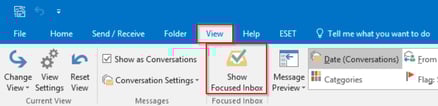
2. Click on the **View **tab and then click on **Show Focused Inbox
**
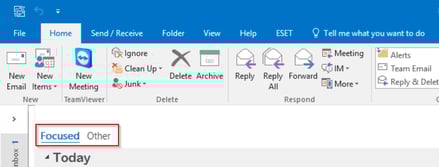
3. Once done, there will be two new options in the inbox folder: **Focused **and **Other**
### Change How Messages are Organized
Since Focused Inbox uses the same algorithm to analyze emails; messages that would normally be moved to Clutter will now show up in **Other **and everything else will end up in **Focused**.
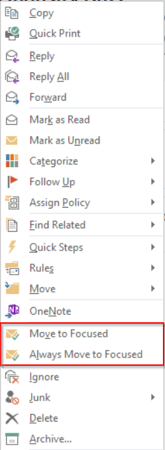
1. If a message ends up in Other that should be in Focused or vice versa, right-click on the message and send it to Focused or Other.
2. It will have two options: **Move to Focused/Other**; which only moves this message to the Focused/Other Inbox or **Always Move to Focused/Other**; which will have all messages from this sender move to Focused/Other Inbox.
** **
**[](https://cta-redirect.hubspot.com/cta/redirect/2136188/419d6876-083c-4c40-a40e-f4178b21ff17)**
[Microsoft](https://blog.integrityts.com/topic/microsoft), [Productivity](https://blog.integrityts.com/topic/productivity), [Office 365](https://blog.integrityts.com/topic/office-365)
### Leave a Reply
## Read On
### [How To Build A Business Case For Manufacturing IT Projects Without Overcomplicating It](https://blog.integrityts.com/manufacturing-it-business-case/)
Manufacturing IT projects are easier to justify when you stop treating them like technology...
### [Manufacturing Cybersecurity Without The Jargon: A Plain-English Guide For Operations Leaders](https://blog.integrityts.com/manufacturing-cybersecurity-plain-english/)
Manufacturers don’t need a cybersecurity program built around buzzwords. They need technology that...
### [What Bank Cybersecurity Auditors Are Really Looking For](https://blog.integrityts.com/what-bank-cybersecurity-auditors-are-really-looking-for)
Cybersecurity auditors are looking for more than technical problems or opportunities to issue...
## CONTACT US
### PROTECT YOUR BUSINESS.
Integrity helps businesses dealing with sensitive data protect against looming cybersecurity threats.
### Address:
816 South Eldorado Road, Suite #4
Bloomington, IL 61704
### Call Us:
[+1 309.662.7723](tel:13096627723)
### Email:
[info@integrityts.com](mailto:info@integrityts.com)
[](https://x.com/integrityts)
#### Customers: Need Assistance Now?
### Call Customer Support:
[+1 888.764.8181](tel:18887648181)
### Email Customer Support:
[remotefix@integrityts.com](mailto:remotefix@integrityts.com)
#### Information & Sales
[](https://www.integrityts.com/)
- [Who We Are](https://www.integrityts.com/who-we-are/)
- [Industries](https://www.integrityts.com/industries/)
- [Services](https://www.integrityts.com/services/)
- [Pricing](https://www.integrityts.com/pricing/)
- [Blog](https://blog.integrityts.com/)
©2026 [Integrity Technology Solutions](https://www.integrityts.com/).
- [Privacy Policy](https://www.integrityts.com/privacy-policy/)
- [Terms & Conditions](https://www.integrityts.com/terms-and-conditions/)
```json
{
"@context" : "https://schema.org",
"@type" : "BlogPosting",
"author" : {
"@type" : "Person",
"name" : "Nikki Fulfer",
"url" : "https://blog.integrityts.com/author/nikki-fulfer"
},
"dateModified" : "2019-07-15T17:43:58.216Z",
"datePublished" : "2018-01-15T16:00:00.000Z",
"headline" : "Focus on Important Emails - Not on Clutter",
"image" : [ "https://blog.integrityts.com/hubfs/Images/FocusEmails.jpg" ],
"mainEntityOfPage" : {
"@id" : "https://blog.integrityts.com/clutter-vs-focused-inbox",
"@type" : "WebPage"
},
"publisher" : {
"@type" : "Organization",
"logo" : {
"@type" : "ImageObject",
"url" : "https://blog.integrityts.com/hubfs/Logos/integrity_1000x187.png"
},
"name" : "Integrity Technology Solutions"
}
}
```